


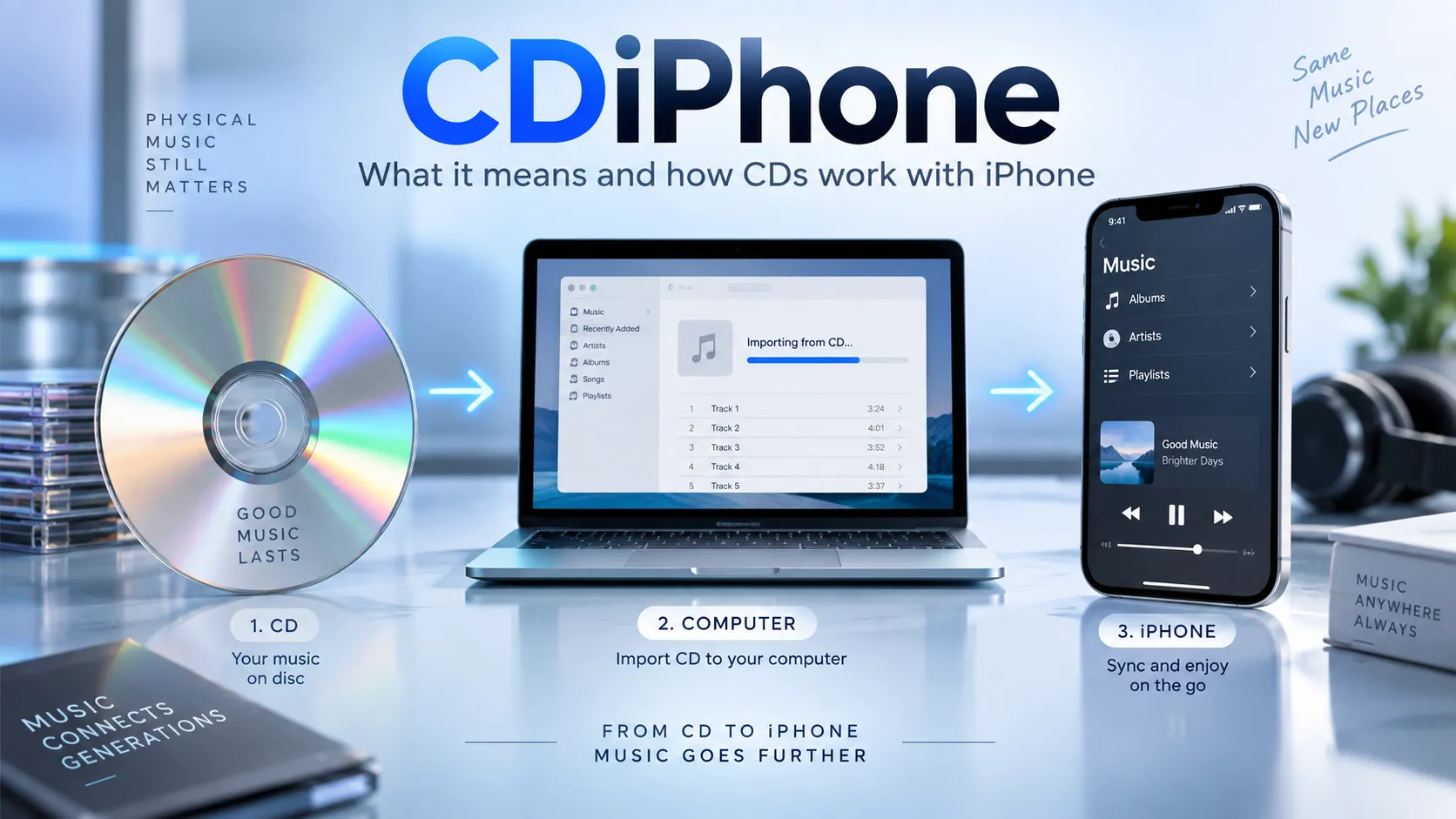
CDiPhone is not an official Apple product, iPhone model, or publicly documented Apple technology. As of September 2026, Apple’s official iPhone identification resources do not list any device called CDiPhone. The term is instead being used informally online, most plausibly in discussions connecting compact discs with iPhones, while some pages attach speculative or unsupported meanings to it.
That distinction matters because searches for CDiPhone now return pages describing everything from a CD-enabled smartphone to virtual storage systems, CDMA iPhones, and Apple diagnostic technology. Those interpretations should not be treated as equally credible. The verified facts are considerably simpler.
What Is CDiPhone?
CDiPhone has no standardized technical definition. Apple does not use the name for a consumer device, iOS feature, service, storage technology, or publicly named accessory.
The most practical interpretation of the keyword is “CD + iPhone”, referring to getting music stored on physical compact discs into a form that can be played on an iPhone. Apple officially supports importing audio CDs into a computer’s music library and then syncing music with an iPhone.
Recent third-party articles use the term in several different ways. Some describe CD-to-iPhone music transfer, while others present hypothetical devices or storage concepts. That variation is evidence that CDiPhone is an informal internet keyword rather than an established technology name.
Is CDiPhone a Real Apple Product?
No verified Apple product called CDiPhone currently exists.
Apple maintains a detailed identification database covering generations of the iPhone, including model numbers, introduction years, capacities, physical characteristics, and regional versions. Its current documentation does not identify a model called “CDiPhone.”
This also means that claims describing an official CDiPhone with a particular processor, display, release date, price, storage system, or built-in CD reader should be treated as unverified unless Apple itself publishes supporting documentation.
A concept image or technology article does not establish that Apple is developing or selling such a product.
| Claim about CDiPhone | Verified status |
|---|---|
| Official Apple iPhone model | No evidence |
| Apple product available for purchase | No evidence |
| iPhone with built-in CD drive | No verified Apple model |
| Standard Apple software feature called CDiPhone | No |
| Informal term connected with CDs and iPhones | Yes, used this way online |
| Method of moving CD music to an iPhone | Technically possible using Apple’s computer software |
Why Is the Term CDiPhone Confusing?
The name looks convincing because it combines two familiar terms: CD, meaning compact disc, and iPhone, Apple’s smartphone brand.
Search results have made matters more complicated by assigning several different explanations to the same word. There is no authoritative evidence showing that these explanations came from Apple or that there was ever one original definition.
CD Music and iPhone
This is the most useful interpretation.
An iPhone cannot accept a conventional audio CD directly because the phone does not contain an optical disc drive. Instead, the audio must first be read by a computer with an internal or external CD/DVD drive.
Apple provides official instructions for importing audio-CD tracks into the Music app on Mac. The default import format is AAC, although users can adjust import settings.
Apple also documents CD importing through iTunes on supported Windows setups.
After importing the tracks, they become normal digital audio files in the computer’s music library and can be transferred or synced to an iPhone.
A Hypothetical CD-Equipped iPhone
Some online articles use CDiPhone to imagine an iPhone capable of interacting directly with discs or a futuristic device inspired by CDs.
There is no verified Apple announcement supporting such a product.
A conventional compact disc also presents an obvious physical challenge for smartphones. Standard CDs are far larger than the internal space available for an optical mechanism inside a modern phone. A working optical drive would require a laser assembly, spindle motor and mechanical components that current iPhones do not contain.
Concept discussions can still be interesting, but they should be clearly identified as concepts rather than product information.
CDiPhone and Apple’s CoreDevice Framework
Another interpretation found online links CDiPhone with Apple’s CoreDevice Framework.
Apple does officially reference a CoreDevice Framework in its developer diagnostic resources for platforms including iOS and macOS.
However, Apple’s documentation does not establish that “CDiPhone” is an official name or abbreviation for CoreDevice on iPhone. Therefore, the existence of CoreDevice should not be used as proof that CDiPhone is an Apple framework, developer product, diagnostic mode, or feature.
This is an important distinction because technical-sounding explanations can easily appear credible when they contain the name of a real Apple framework.
Could CDiPhone Mean a CDMA iPhone?
Sometimes CDiPhone may be confused with CDMA iPhone, which refers to older iPhones designed for Code Division Multiple Access cellular networks.
That was a real distinction in earlier generations of smartphones. For example, the Verizon version of the iPhone 4 introduced in 2011 used CDMA cellular technology, in contrast with the GSM-oriented version sold through other networks. The CDMA iPhone 4 is documented as model A1349 by established device databases.
But CDMA iPhone and CDiPhone are not the same term.
CDMA describes a cellular network technology. It has nothing to do with compact discs, optical drives, or a product officially named CDiPhone.
Also Read: Fascisterne: Meaning, History, and Danish Context
How to Put Music From a CD on an iPhone
You do not need a special “CDiPhone” device to listen to music from your CD collection on an iPhone. Apple’s documented workflow is to digitize the CD on a computer first.
Using a Mac
Insert the audio CD into a Mac with an optical drive or connect a compatible external CD/DVD drive.
Open the Music app. Apple lets you choose whether inserting a CD should display, play, automatically import, or ask before importing it. Select the tracks you want and use Import CD to add them to your music library.
Apple says AAC is the default encoding format. After importing, the physical disc is no longer required to play those copies from the computer.
Next, connect the iPhone to the Mac. In Finder, select the iPhone and choose the music you want to sync. Finder supports syncing all music or selected artists, albums, genres, and playlists.
Once Wi-Fi syncing has been configured through an initial cable connection, compatible devices can also sync while the Mac and iPhone are on the same network.
Using Windows
Apple continues to document importing audio CDs using iTunes on Windows.
Insert the disc into the computer’s CD/DVD drive or an external optical drive, open iTunes, select the CD and choose Import CD. Apple says AAC is the default encoding option, while other formats can be selected through import settings.
Apple’s newer Windows device-management workflow uses the Apple Devices app for syncing content with an iPhone. Apple documents music syncing over either USB/USB-C or Wi-Fi and lets users transfer all music or selected artists, albums, genres and playlists.
The exact applications involved can therefore depend on your Windows configuration and which Apple software you use.
Can You Connect a CD Drive Directly to an iPhone?
A USB-C connector on a recent iPhone does not turn the phone into a conventional computer capable of ripping audio CDs through Apple’s Music app.
Apple’s documented CD-import procedures are written for Mac and Windows computers, not for iPhone. The supported workflow is to import or rip the disc on a computer and then transfer or synchronize the resulting audio files.
That is different from connecting ordinary USB accessories such as storage drives.
Third-party hardware or software may advertise alternative workflows, but compatibility should be verified with the specific device and app before purchasing anything.
Which Audio Format Should You Use?
The best format depends on whether storage space, compatibility or audio preservation matters most.
Apple’s CD-import tools support several formats depending on the platform and software being used. AAC is Apple’s default choice for CD importing. iTunes documentation also lists formats including AIFF, Apple Lossless, MP3 and WAV.
AAC is sensible for most people because it provides good quality without producing extremely large files.
Apple Lossless, commonly associated with lossless audio preservation, is more appropriate when retaining the source audio without lossy compression is important, though the files consume more storage.
MP3 remains useful when broad compatibility with non-Apple hardware and software is a priority.
AIFF and WAV can also provide high-quality audio but typically require considerably more space.
Does Importing a CD Give You Apple Music Streaming Access?
No. Music imported from a CD and music provided through an Apple Music subscription are different things.
A CD import creates digital files in your personal music library. An Apple Music subscription provides access to Apple’s streaming catalog under the service’s subscription terms.
Apple’s synchronization documentation also distinguishes between manually synced music and libraries using Apple Music’s cloud-based Sync Library functionality.
This distinction becomes important when troubleshooting duplicate songs, missing tracks, or disabled manual-sync options.
How to Spot False CDiPhone Claims
Because CDiPhone sounds like a plausible Apple product name, readers should verify claims before trusting them.
Be especially cautious when a page provides precise specifications such as a launch date, processor name, battery capacity, “virtual disc” architecture, price, camera configuration, or Apple release schedule without linking to an Apple announcement or official technical documentation.
A reliable check is straightforward. Search Apple’s official iPhone model-identification pages and Apple Support documentation. Apple’s current model database provides actual model names and identifiers and does not list CDiPhone.
The same principle applies to alleged leaks. A repeated claim across several small websites does not become verified simply because multiple pages reproduce it.
What CDiPhone Actually Means in 2026
The safest definition of CDiPhone is an unofficial and context-dependent internet term associated with the iPhone.
If the context involves music, it most likely refers to bringing content from CDs onto an iPhone. That process is real and supported through Apple’s desktop music and syncing tools.
If the term is being presented as a new Apple phone, proprietary storage technology, CoreDevice feature, or futuristic product, there is currently no authoritative Apple evidence confirming those interpretations.
Frequently Asked Questions
Is CDiPhone made by Apple?
No. Apple’s official iPhone documentation does not list a device or consumer product called CDiPhone.
Can I buy a CDiPhone?
There is no verified Apple phone sold under the CDiPhone name. Listings or articles claiming otherwise should be checked carefully against Apple’s official product information.
Can an iPhone play music from a CD?
Yes, after the CD’s audio has been imported into a digital music library. Apple officially supports importing CDs on Mac and through iTunes on compatible Windows setups, after which the music can be synced to an iPhone.
Does an iPhone have a CD drive?
No current Apple iPhone has a built-in optical CD drive. Apple’s documented method for using CD music with an iPhone requires importing the disc on a computer first.
Is CDiPhone another name for a CDMA iPhone?
Not officially. Older CDMA iPhones were genuine devices designed for CDMA cellular networks, but “CDiPhone” is not Apple’s standard name for them.
Is CDiPhone related to Apple CoreDevice?
Apple does have a CoreDevice Framework referenced in its developer diagnostic documentation, but Apple does not identify CDiPhone as its official name or abbreviation. Any claimed connection remains unverified unless supported by additional Apple documentation.
Also Read: FlowXD: What It Really Means in 2026
